01 Problem — example scenario
A SOX-regulated financial institution needs a unified mortgage-servicing dashboard. Reporting definitions vary across departments, refreshes are slow, and auditors require traceability and access controls. Executives cannot agree on a single number, and every reporting cycle triggers manual reconciliation.
02 Constraints
- Access must follow SOX segregation-of-duties — users see only the portfolios they are authorized for.
- Every metric must trace to a governed, documented source definition (no ad-hoc report-level logic).
- Refresh windows are tight; full reloads of large fact tables are not acceptable.
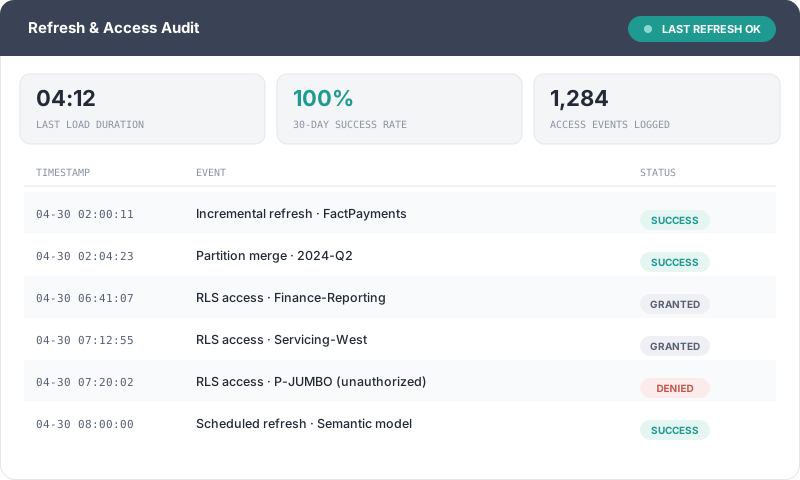
- Auditors require evidence: lineage, refresh history, and an access audit trail.
03 Architecture — lineage diagram
Source systems flow through governed SQL views into a partitioned star schema and a documented semantic layer. The keystone is the semantic model, where definitions and security live.
04 Dimensional model — star schema
A classic star keeps the model fast and the definitions unambiguous: one fact surrounded by conformed dimensions.

05 Solution demonstration
The example dashboard standardizes definitions and makes them explorable while keeping controls intact:
- KPI cards, drill-through & bookmarks for guided executive narratives.
- Time-intelligence measures (MTD/QTD/YTD, prior-period, rolling) built once in the model.
- A documented semantic layer — every DAX measure has a description and a source lineage note.
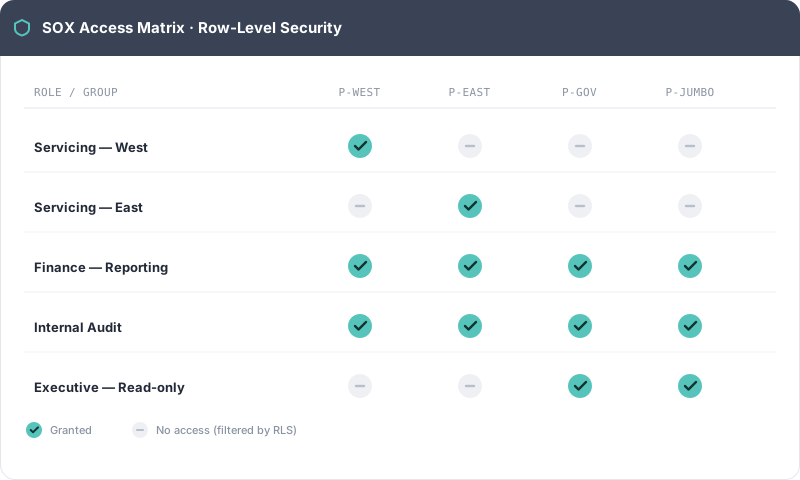
- Row-Level Security tied to SOX-compliant access groups.
- A refresh log & access audit report surfaced as SOX evidence.
06 Dashboard — interactive executive view
This dashboard demonstrates the full solution — KPI cards & drill-through, MTD/QTD/YTD time-intelligence, saved bookmarks, and live Row-Level Security: change Viewing as and watch the model filter to only the portfolios a role may see. Sample data.
| Loan # | Product | UPB | Rate | Status | Next due |
|---|
07 DAX — semantic-layer measures
Measures are authored in the semantic layer with time-intelligence and clear naming so report authors never redefine business logic.
// -- Total scheduled principal + interest collected (MTD) --
Payments Collected MTD =
    CALCULATE(
        SUM( FactPayments[AmountCollected] ),
        DATESMTD( DimCalendar[Date] )
    )

// -- Delinquency rate with SOX-safe division --
Delinquency Rate =
    DIVIDE(
        CALCULATE( [Active Loans], DimStatus[IsDelinquent] = TRUE ),
        [Active Loans]
    )

// prior-period and rolling-12M variance measures follow the same pattern
08 RLS & SOX control explanation
Row-Level Security enforces SOX segregation of duties directly in the model. A security table maps each user (or AD group) to the portfolios they are authorized to view; the RLS role filters every fact query to that authorization. Because the rule lives in the model — not in each report — it is testable, documented, and auditable.
// Applied on DimBranch; USERPRINCIPALNAME() maps to the SecAccess security table
DimBranch[BranchKey]
    IN
    CALCULATETABLE(
        VALUES( SecAccess[BranchKey] ),
        SecAccess[UserPrincipal] = USERPRINCIPALNAME()
    )
09 Outcome — demonstration
This example shows how a modern Power BI solution can, in practice:
- Improve performance through incremental refresh and partitioning.
- Standardize definitions so every department reads the same number.
- Provide audit-ready documentation — lineage, refresh logs, and access trails.
- Deliver interactive analytics executives can trust and act on.